Public forms: collecting table rows from outside your workspace
Publish a form on a table so people outside your workspace can submit rows, choosing exactly which fields to expose and how many submissions a day to accept.
A public form turns a table into an intake surface. It gives you a shareable link that anyone can open, without signing in, to submit a row into your table: a lead capture, an application, a request queue. You control exactly which fields appear, how they are labeled, and how many submissions a day to accept. Forms live on a table's Forms tab.
Create a form
On the Forms tab, click New form and the builder opens. You give the form a name, then choose which of the table's columns to expose as fields. For each field you can set a friendly label, optional help text, and whether it is required. You also set a daily submission cap: the maximum number of submissions the form will accept in a day, which is your basic protection against a form being hammered.
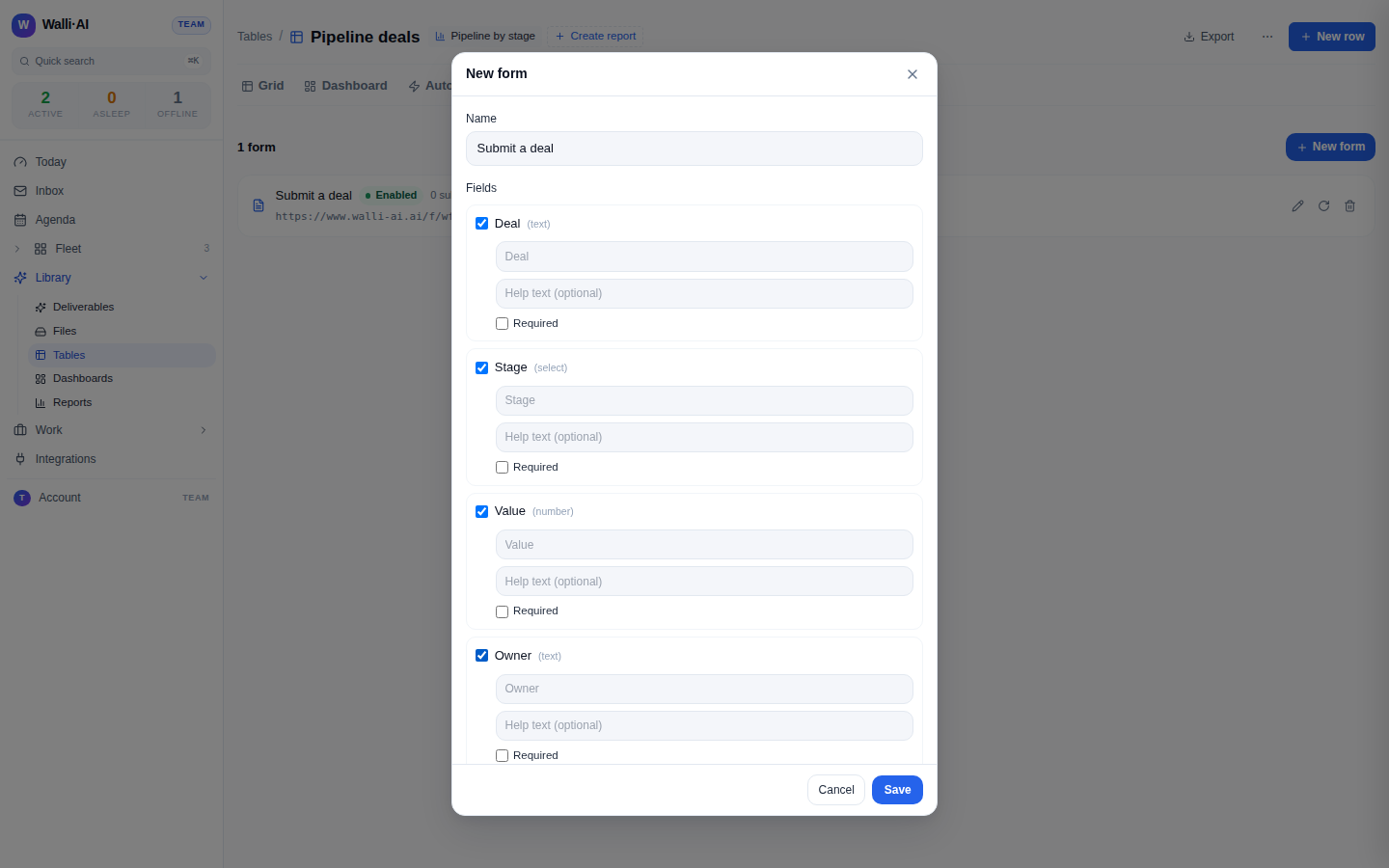
Only some columns can be exposed
The field checklist deliberately offers only columns a stranger can actually fill in: the plain scalar types (text, number, date, bool, select). It does not offer link, lookup, rollup, formula, file, or json columns. The reasoning is concrete: an unauthenticated submitter cannot resolve a relationship to another table, cannot meaningfully write to a computed column (those are derived, not entered), and should not be uploading files or raw JSON into your data. The builder shows a note explaining why those columns are absent, rather than leaving an unexplained gap in the list. If you edit a form after a column it used was deleted or changed to a non-exposable type, the builder tells you that field was dropped.
Share the link, and rotate it if needed
When you save a form, Walli-AI mints a secret token and builds a public URL from it. Share that URL and submissions flow into your table. If the link ever leaks or you simply want to retire it, rotate the token: rotating mints a new URL and immediately invalidates the old one, so a link you have shared too widely stops working the moment you rotate. This is the clean way to cut off an over-shared form without losing the form's configuration or its collected rows.
Enable, disable, and delete
A form can be turned off without being deleted. Disabling it stops accepting submissions but keeps the token, so re-enabling later restores the same URL, which is handy for a form you run seasonally. Deleting a form removes it and its token pointer for good. Enabling and disabling is a toggle in the builder; you edit a form's fields, labels, cap, and enabled state at any time, and the fields are re-validated against the table's current columns whenever you change them.
What a submitter sees
The public page is deliberately minimal and leaks nothing about your workspace. When someone opens the form URL, the server returns only the form's name and its fields (with your labels, help text, and required flags); the table id, the workspace id, the form id, the token, the submission count, and the daily cap never leave the server. A bad link is indistinguishable from a disabled or deleted one: an unknown token, a rotated-away token, and a switched-off form all return the same "not found" response, so a stale URL cannot even confirm that a form once existed there.
What a submission does
A valid submission writes a row into the table through the same validated path every other write uses, so values are type-checked, coerced, or quarantined exactly as they would be from the grid or an import. Only the fields you exposed can be written; nothing a submitter sends can reach a column you did not put on the form. The submit endpoint is guarded on several fronts: a request body over a fixed size is rejected outright (before it is even parsed), a per-minute rate limit absorbs bursts, the daily cap stops a form once it has taken its allotment for the day, and a submission that would push the table past its row limit is refused too. Each of those returns a clear error rather than quietly dropping or partially writing the row, and the form keeps a running count of how many submissions it has taken.
Submitted rows are treated as untrusted
This is the most important safety property of forms. Every row that comes in through a public form is tagged as external. When an agent later queries the table and any returned row originated from the public intake path, the query result carries a prominent warning so the agent treats that content as untrusted input, no matter how the row reached the query (a direct read, an automation, a scheduled scan). In other words, letting the public write into a table never quietly lets the public put words in your agents' mouths: the provenance follows the data and the agent is told to be careful with it. This pairs naturally with table automations: you can have an agent triage new form submissions the moment they arrive, while still handling their content as untrusted.
A typical setup
A common pattern is a small table with a public form on the front and an automation on the back. The form exposes a few fields (name, email, request), the table stores the submissions, and an insert automation runs an agent to acknowledge or route each new row. You get a clean intake pipeline, entirely inside your workspace, with the row limit and daily cap keeping it bounded and the untrusted tag keeping it safe. For where rows land and how to review a single submission, see The row detail panel; for how row limits and storage work, see Importing and exporting and the billing page.