Moving from spreadsheets and manual busywork
If you run your operation in spreadsheets and manual copy-paste, here is how Tables, automations, and scheduled agents replace the recurring work, what to migrate first, and what stays in a spreadsheet.
Spreadsheets are where a lot of real operations actually live: the deal tracker, the invoice log, the content calendar, the list of leads you enrich by hand. They are flexible and everyone knows them, and that is exactly why the manual work around them piles up: someone copies data in, someone reformats it, someone checks it every morning, someone builds the same summary every week. Walli-AI does not ask you to abandon spreadsheets. It gives you a place to move the recurring, mechanical part of that work so a machine does it on a cadence, while the ad-hoc, exploratory part stays where it belongs. This article is the honest map of what moves, what stays, and how to start.
Tables are a real database, not a spreadsheet clone
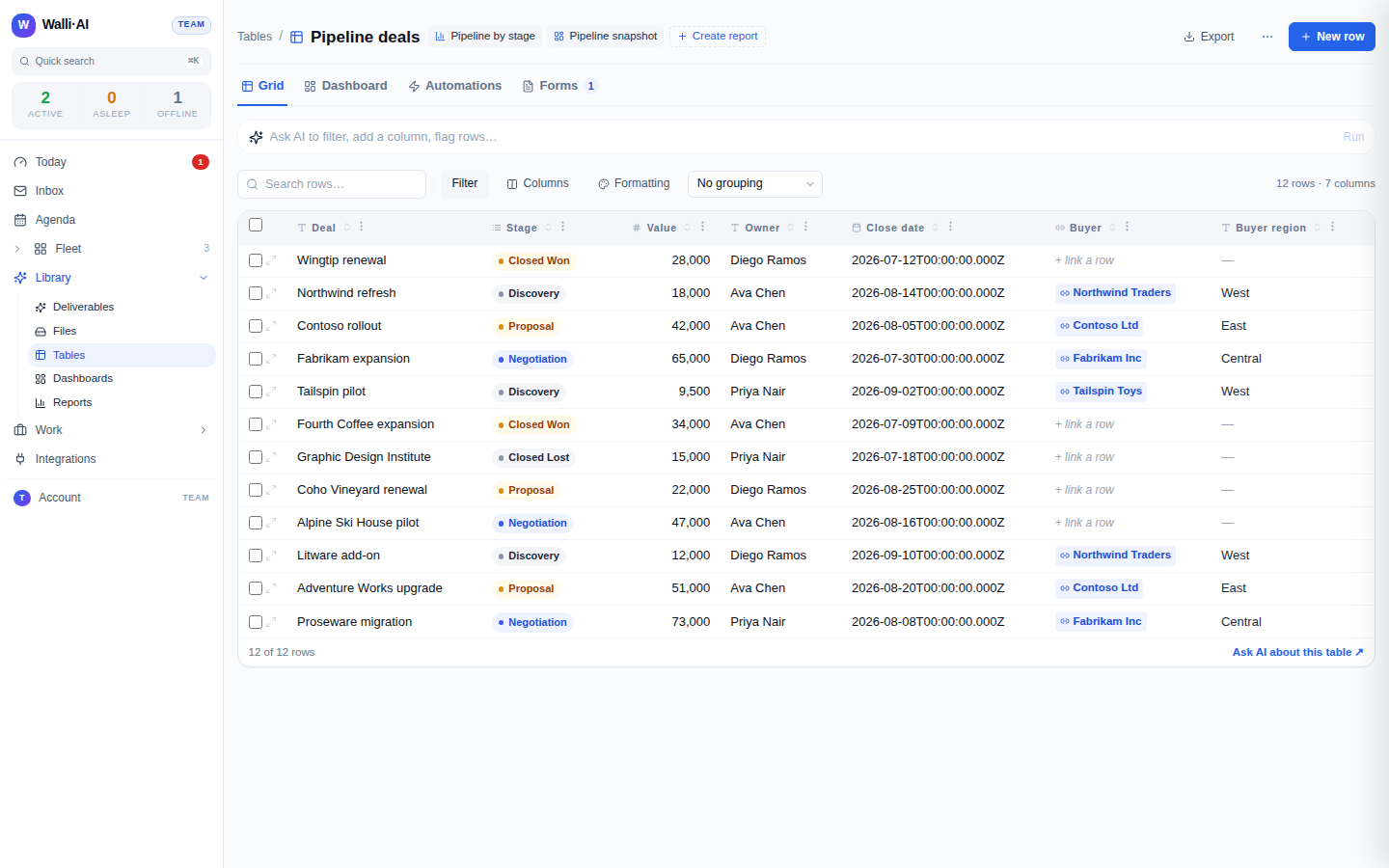
The foundation is Tables, and the important thing to understand is that a Walli-AI table is a genuine relational database with typed columns, not a grid of freeform cells. That difference is what makes the busywork go away.
- Typed columns. Each column has a type (text, number, date, select, and so on) and values are validated on the way in. A number column holds numbers, so it sorts and aggregates correctly, and a bad value is coerced or quarantined rather than silently corrupting a total.
- Linked records, not copied ids. A
linkcolumn is a real relationship to another table (deals belong to a buyer, invoices to an account), so you stop pasting the same customer details into every row. From any row you can see what it points to and, in the row detail panel, what points back at it. See Linking tables: linked records, lookups, rollups, and formulas. - Lookups, rollups, and formulas replace fragile cell math. A
lookuppulls a field across a link, arollupaggregates the rows that link back (the total value of a buyer's deals, the count of open invoices), and aformulacomputes from other columns in the same row. These are computed at read time and are read-only, so they can never drift out of sync the way a dragged-down spreadsheet formula does when someone inserts a row in the wrong place. - Views instead of duplicate tabs. Grouping, filtering, sorting, and kanban are saved views over the one set of data, so you stop keeping five near-identical tabs that have to be reconciled by hand. See Table views: grouping, kanban, saved views, sorting, and filtering.
Start by importing a CSV
You do not rebuild your data by hand. Export any spreadsheet to CSV and import it: from the Tables index, Import CSV reads the first row as headers, creates one column per header, infers each column's type from a sample of the values, and loads every row in one pass. To grow an existing table, import into it and headers are matched to your columns by name. The full behavior, including how imperfect rows are quarantined and how row limits work, is in Importing and exporting table data (CSV). This is the front door: get the data in first, then wire the automation around it.
Automations replace the "every morning I..." work
The recurring manual step, the thing you do by hand on a cadence, is what moves to an automation. A table automation binds a trigger to an agent action, and there are two kinds of trigger.
- When a row changes fires the moment a row is inserted, updated, or deleted, and you can narrow it with conditions (only deals over a threshold) or transitions (only when Stage becomes "Closed Won"). This replaces "when a new lead lands I copy it somewhere and start enriching it" with an agent that does exactly that, automatically, however the row arrived, including a CSV import or a kanban drag.
- On a schedule scans the table on a cron cadence and acts on the rows that match, either notifying once when a row first matches or acting on all matching rows each run. This replaces "every Monday I go through the open items and chase them."
The action the automation runs is an agent, either a one-off message or a saved workflow, so the reaction can involve real judgment (read the row, decide, enrich it, summarize it) rather than a fixed rules payload. Automations are rate-limited and chain-depth bounded so a burst of edits cannot stampede an agent. The whole builder is covered in Table automations: run an agent when rows change or on a schedule, and letting an agent read and write the data safely is in Letting an agent enter and query table data.
Scheduled agents replace the recurring report
The other half of spreadsheet busywork is the summary you rebuild by hand: the weekly numbers, the pipeline snapshot, the status roll-up you paste into an email. Two features retire that. Reports are structured, deterministic computations over your tables, so a report's numbers are computed by the platform rather than by a formula you have to trust, and dashboards are live tiles over those tables and reports that update on their own instead of a stale tab you refresh manually. See Reports overview and Dashboards: live tiles over your tables and reports. And a scheduled agent can take the last step you still do by hand, turning that report into a written brief and delivering it to your inbox draft or a team channel every morning, which is exactly the shape of the worked example in A daily standup digest, posted to your team channel.
What honestly stays in a spreadsheet
A fair migration is not "move everything." Spreadsheets remain genuinely better for some work, and forcing it into a database is a mistake.
- One-off, exploratory analysis. A quick pivot to answer a question you will not ask again, a scratch model, a what-if you build and throw away. That is faster in a spreadsheet, and an agent can even produce a formatted xlsx analysis for you when you want one, as in Turn a spreadsheet into a formatted xlsx analysis with charts.
- Free-form grids that are not really records. A layout, a mock-up, a budget you are sketching. If the data does not have a consistent shape, a typed table fights you.
- Anything you are still figuring out the structure of. Model it loosely in a sheet first, and move it to a table once the columns have stabilized and the recurring work around it is clear.
The rule of thumb: structured records you maintain and act on repeatedly want a table and automations; one-time or shape-shifting analysis wants a spreadsheet. Migrate the first kind, keep the second.
What to migrate first
Pick the spreadsheet that costs you the most manual minutes per week, not the biggest one. Usually that is the tracker with a daily or weekly ritual attached: the lead list you enrich, the deal pipeline you review, the invoice log you chase. Import it as a table, add the one automation that removes the ritual (enrich on insert, or a Monday digest of open rows), and wire a scheduled agent to deliver the summary you used to build by hand. One migrated ritual, proven end to end, tells you far more than moving ten sheets you then have to rewire. Once that one is running without you, the next is obvious.
Tips
- Export to CSV and import; never retype data. The type inference does the schema work, and quarantine tells you honestly which rows need a look.
- Migrate the ritual, not just the data. A table with no automation is a nicer spreadsheet; a table with the right row-change or scheduled automation is the thing that removes the manual step.
- Model links properly on the first table you move. Replacing pasted-in customer details with a real
linkcolumn is where the reconciliation busywork disappears. - Keep one-off analysis in a spreadsheet, and let an agent generate a formatted xlsx when you need a polished one. You are moving the recurring work, not banning spreadsheets.