Letting an agent enter and query table data
Add, update, and answer questions from a table by asking an agent, or use the grid's AI command bar to filter, add columns, and flag rows in plain English.
You do not have to type into the grid to work with a table. Agents can read and write tables through their table tools, and every table's Grid tab has an AI command bar that turns plain English into grid operations. This article covers both: telling an agent to enter and query data, and using the on-grid command bar.
Just tell an agent
An agent with the table tools can do everything you can do in the grid, driven by a sentence. You can say things like:
- "Add a deal: Northwind refresh, stage Discovery, value 18,000, owner Ava Chen" and the agent inserts the row.
- "Mark the Contoso deal as Closed Won" and the agent finds the row and updates the cell.
- "What is the total value of open deals this quarter?" and the agent queries the table and answers from the real rows.
This works in chat and inside workflows, so an agent can gather data from a connected tool (an inbox, a CRM, a spreadsheet) and land it in a table as part of a scheduled run, not just when you are watching.
The tools an agent uses
Under the hood, an agent has a small, explicit set of table tools:
- tables_list lists the tables in the workspace with their columns and row counts, so the agent can discover what exists.
- table_get_schema reads a table's columns and types before writing, so it writes to the right fields.
- table_query reads rows, with the same filtering, sorting, searching, and paging the grid uses, so an agent can answer a targeted question instead of pulling everything.
- table_insert_rows and table_update_rows write rows (cells keyed by column name); table_delete_rows removes them.
- table_create makes a new table, either empty (to be shaped on first write) or with columns.
- table_attach_file attaches a file the agent produced to a row's file column, so a workflow can sink its deliverable straight onto the row it belongs to.
Identity is never taken from a tool argument: which workspace and which agent is acting comes from the verified session, so an agent can only ever touch its own workspace's tables.
Honest writes, not silent blanks
When an agent writes, the same validation the grid and imports use applies. A value that fits is stored; a near-miss is coerced and reported; a value that does not fit its column is quarantined for review. Crucially, if an agent invents a field name that matches no column, that row is reported back as not written (with the reason) rather than saved as a blank, so an agent gets an honest signal and can correct itself instead of quietly filling the table with empty rows. Bulk agent writes are capped per call so a runaway loop cannot flood a table; the CSV import path is the intended route for large loads. See Importing and exporting.
Rows an agent creates carry that provenance. The grid's status bar tells you how many rows were "added by agent runs", and each such row links back to the run that created it from the row detail panel.
The on-grid AI command bar
Every table's Grid tab has an AI command bar across the top ("Ask AI to filter, add a column, flag rows..."). Type an instruction and it is translated into concrete grid operations against the current view. It can reshape the view (apply a filter, sort, or grouping), change the schema (add, rename, retype, reorder, hide, or delete a column), and edit data (update a cell, bulk-set a column across many rows, or delete rows).
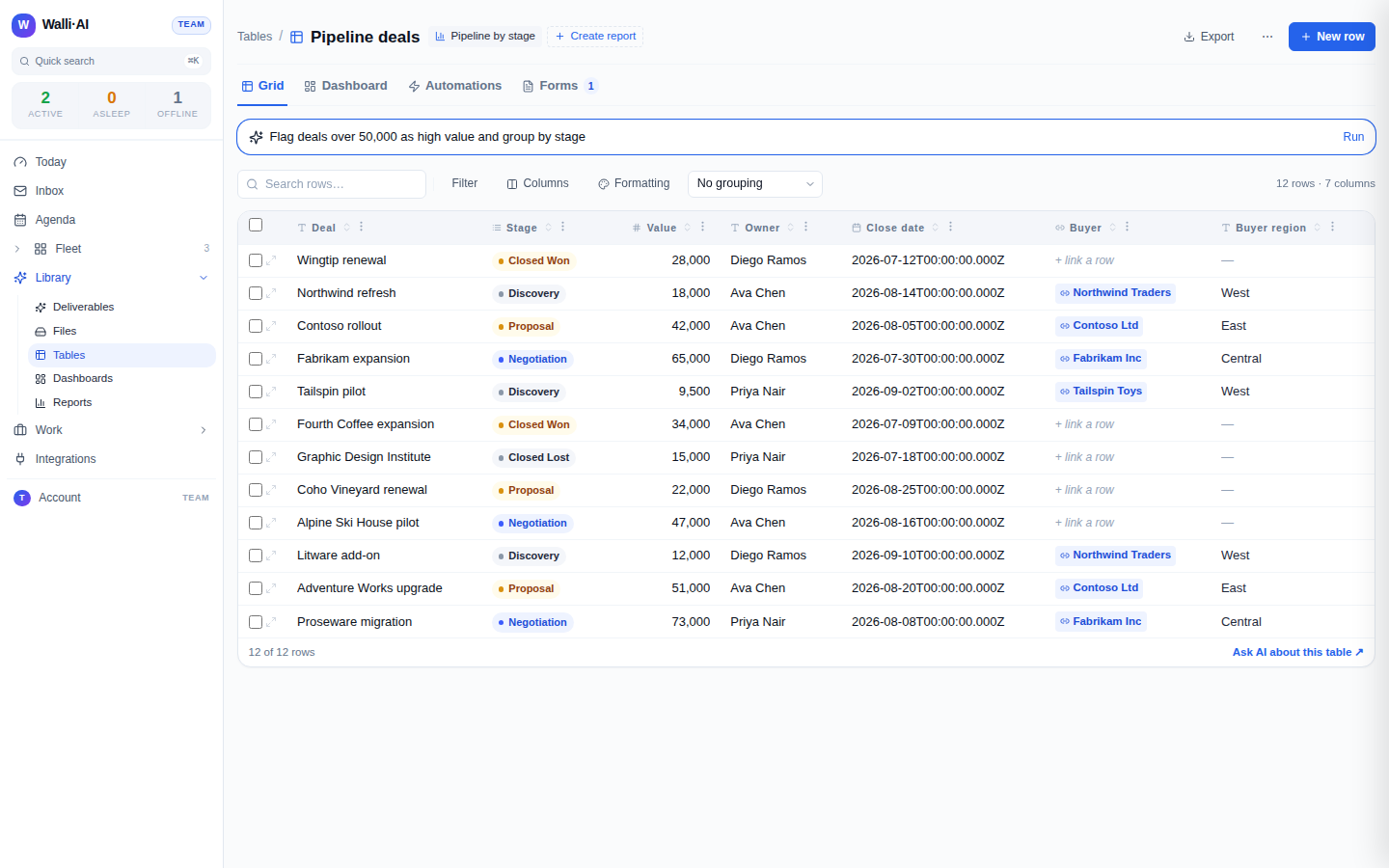
Not every operation is applied blindly. The command bar splits its plan into changes it can auto-apply (safe, additive things like adding a filter or a new empty column) and changes it asks you to confirm (anything that would overwrite existing values), so a "set every open deal's owner to Ava" runs only after you approve it. You review the plan, apply the confirmations you want, and dismiss the rest.
Querying, not calculating
When you want a number from a table, ask the agent to read it, not to estimate it. The query tool returns the actual rows, and for computed figures over a table (totals, counts, trends, groupings) the right instrument is a report, whose numbers come from a deterministic engine rather than the model's own arithmetic. An agent is instructed to run a report for figures rather than compute them itself, so the numbers you get are the real ones. See Reports.
A note on trust
Rows that arrive through a public form are tagged as external. When an agent queries a table and any returned row came from that public intake path, the result carries a prominent warning so the agent treats that content as untrusted input, no matter how it reached the query. This keeps agent-driven work over a table safe even when the table is partly filled by people outside your workspace. See Public forms.
Putting it together
Agent entry and the command bar are two ends of the same idea: you describe the outcome and Walli-AI does the typing. Use an agent for gathering, cleaning, and answering from data across a whole workflow; use the command bar for quick, in-context reshaping of the table in front of you. Both go through the same validated write path as manual editing and CSV import, so however a row lands in a table, it lands typed, checked, and traceable.