What an agent remembers (conversation memory & recent decisions)
Agents recall relevant past conversations and their recent work, and you can inspect or delete exactly what they remember.
Your agents are not stateless. They carry context across conversations so you do not have to re-explain yourself every time, and they pick up ongoing work where they left off. There are a few distinct kinds of memory at play, and Walli-AI gives you a page to inspect and prune what an agent has indexed. This page explains what an agent remembers, how recall works, and how to view or delete specific memories.
What you can do
- Rely on an agent recalling relevant parts of your earlier conversations.
- Count on a short rolling summary of the agent's own recent work.
- Inspect the exact chunks of conversation an agent can recall.
- Delete a memory so the agent stops recalling it.
- See when recall last happened and re-index on demand.
The kinds of memory
- Conversation memory. An agent recalls relevant parts of your earlier conversations with it when they help the current message. Past context is pulled in only when it is actually relevant, so old threads do not crowd out what you are asking now.
- "What it decided recently." Each agent carries a short rolling summary of its own recent run outcomes (roughly the last two weeks), so it continues ongoing work instead of starting cold.
- Team awareness. An agent also has light awareness of what your other agents have been doing recently, so hand-offs between them make sense.
Conversation memory is indexed from session transcripts on a schedule (about every six hours), so a brand-new agent has an empty memory until it has actually talked to someone.
How recall works during a message
When you send a message, Walli-AI checks whether any indexed memory is relevant to what you asked and, if so, pulls those passages into the agent's context before it answers. The key word is relevant: old conversations are not dumped in wholesale, they enter only when they help the current request, which keeps the agent focused. The agent can also reach for memory itself mid-conversation when it decides it needs more history.
The rolling "recent decisions" summary works differently. Rather than being retrieved on a match, the last couple of weeks of the agent's own run headlines are always kept in view, so it stays oriented on ongoing work even at the start of a fresh conversation. Team awareness adds a light layer of what your other agents have been doing, which is what makes hand-offs between them coherent.
Inspect what an agent remembers
Every agent has a Memory page that lists the indexed chunks (pieces of past conversation) it can recall during chat.
- Open the agent and go to its Memory page (
/agents/{id}/memory). The header shows how many active entries the agent has indexed. - Browse the table of chunks: each row shows when it was created, which session it came from, and a preview of the text.
- Click View on any row to read the full chunk.
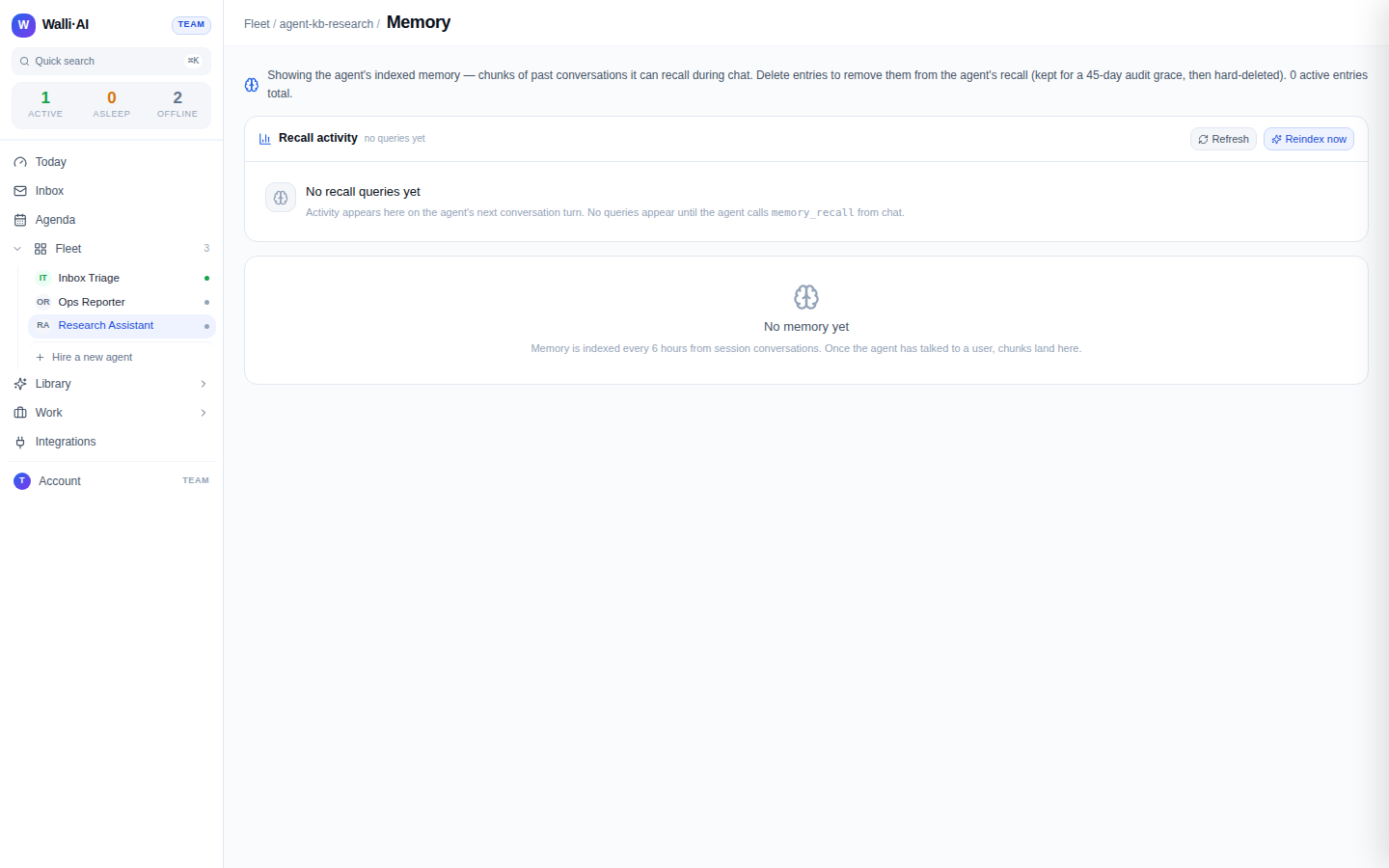
The page also shows a recall activity panel: the agent's recent recall queries, a "re-index now" action, and a banner if recall has gone quiet, so you can tell at a glance whether memory is actively feeding the agent. A brand-new agent shows an empty memory until its first conversations are indexed.
Delete a memory
If an agent is recalling something stale or that you would rather it forgot:
- On the Memory page, click Delete on the chunk.
- Confirm. The entry is soft-deleted: the agent stops recalling it immediately. It is retained for a 45-day audit grace period and then hard-deleted automatically.
Deleting a chunk removes it from the agent's recall right away. During the 45-day grace window it can still be restored by support if you change your mind; after that it is permanently gone.
Deleting a chunk only affects conversation recall. The rolling "what it decided recently" summary is built from the agent's own run headlines rather than from indexed chunks, so it is not something you edit from the Memory page: it simply ages out on its own rolling two-week window. If an agent keeps referencing a recent outcome you would rather it dropped, that reference is usually coming from the rolling summary, and it will fall away as newer work replaces it rather than needing a manual delete. The Memory table is for the retrievable conversation chunks; the two mechanisms are deliberately separate.
Make something stick
Memory is about relevance, not a guarantee that every detail is retained forever. If something important should always be used, do not rely on conversation recall alone:
- Tell the agent the standing instruction or preference directly, or
- Put it in the agent's Knowledge so it is retrieved on demand (see Giving an agent knowledge).
Tips
- If an agent seems to have "forgotten" a recent decision, check the Memory page: the relevant session may not be indexed yet, or you may have deleted the chunk.
- Use the recall activity panel's re-index action after a big conversation if you want its content available to recall sooner than the next scheduled pass.
- Memory is scoped to your tenant and never shared across customers.