How agents actually work
The mental model behind the product: what an agent is made of, how memory and knowledge differ, how schedules and channels put agents to work, and what autonomous really means here.
If you have only ever used a chat window, "an AI agent that runs your work" is hard to picture. The good news is that the model is simple once you see the pieces: an agent is a worker you assemble from a few named parts, you put it to work by pointing schedules and channels at it, and a layer of intelligence surfaces what needs you. This article draws that whole picture so a prospect can imagine actually using Walli-AI, and it defines the word that makes people nervous, autonomous, in terms of the specific guardrails that back it.
An agent is a worker you assemble
An agent is not a personality in a box; it is a small set of parts you choose:
- A role and a name. You hire an agent for a job (a support desk, a bookkeeper, an analyst, a chief of staff), and that framing shapes how it behaves.
- A model. Each agent runs one AI model, either a managed Walli-AI Spark model or one on your own provider key. You can change it any time.
- Skills. Skills are packaged capabilities you switch on for an agent: reusable know-how for a kind of task. An agent with the right skills knows how to do the job you hired it for without you re-explaining it each time.
- Tools. Tools are the real integrations an agent can act through: Gmail, Slack, Discord, GitHub, your calendar, the data suite, a code sandbox. Tools are how an agent changes something in the world rather than just talking about it.
Assemble those four and you have a worker. The rest of the platform is about giving it context and putting it to work.
Memory and knowledge are different things
People conflate these two, and keeping them straight is the key to the whole mental model.
- Memory is what an agent remembers about your business over time: decisions you made, people and companies you deal with, deals in flight. It persists across sessions, so an agent does not start from zero every conversation, and it is relevance-gated, meaning the agent recalls what matters to the task in front of it and ignores the rest. Memory is earned and accumulated automatically as you work.
- Knowledge is a body of reference material you deliberately upload: docs, policies, product information. An agent searches it to ground its answers, and it is isolated to your workspace. Knowledge is a library you stock; memory is experience the agent builds.
The difference in practice: you upload your refund policy as knowledge, and the agent remembers that you decided last month to waive fees for a specific customer as memory. Both feed the same answer, from different sources.
Schedules and channels put agents to work
An assembled agent does nothing until you give it a way to be triggered. There are two, and most useful setups use both.
- Schedules run an agent's work on a cadence: cron-precise, in your timezone. A morning brief at 7 a.m., a report every weekday, a month-end summary. Schedules are where Walli-AI does its quietest, most valuable work, because the job runs whether or not you remember it. If a schedule starts failing in a consistent way, the platform notices and proposes a fix rather than silently failing forever.
- Channels let an agent respond to inbound messages in the tools your customers and team already use: Gmail, Slack, Discord, Telegram. Incoming chat messages pass through a fast triage step that short-circuits spam and social noise before an agent spends real work on them, so an agent watching a busy channel is not burning effort on every "thanks!"
A workflow is the unit of work a schedule or channel fires: a triage pass, a report build, a follow-up nudge. Workflows return a structured result (a headline, a next action, and a deliverable) instead of a wall of text, which is what lets their output roll up cleanly into your day.
The intelligence layer surfaces what needs you
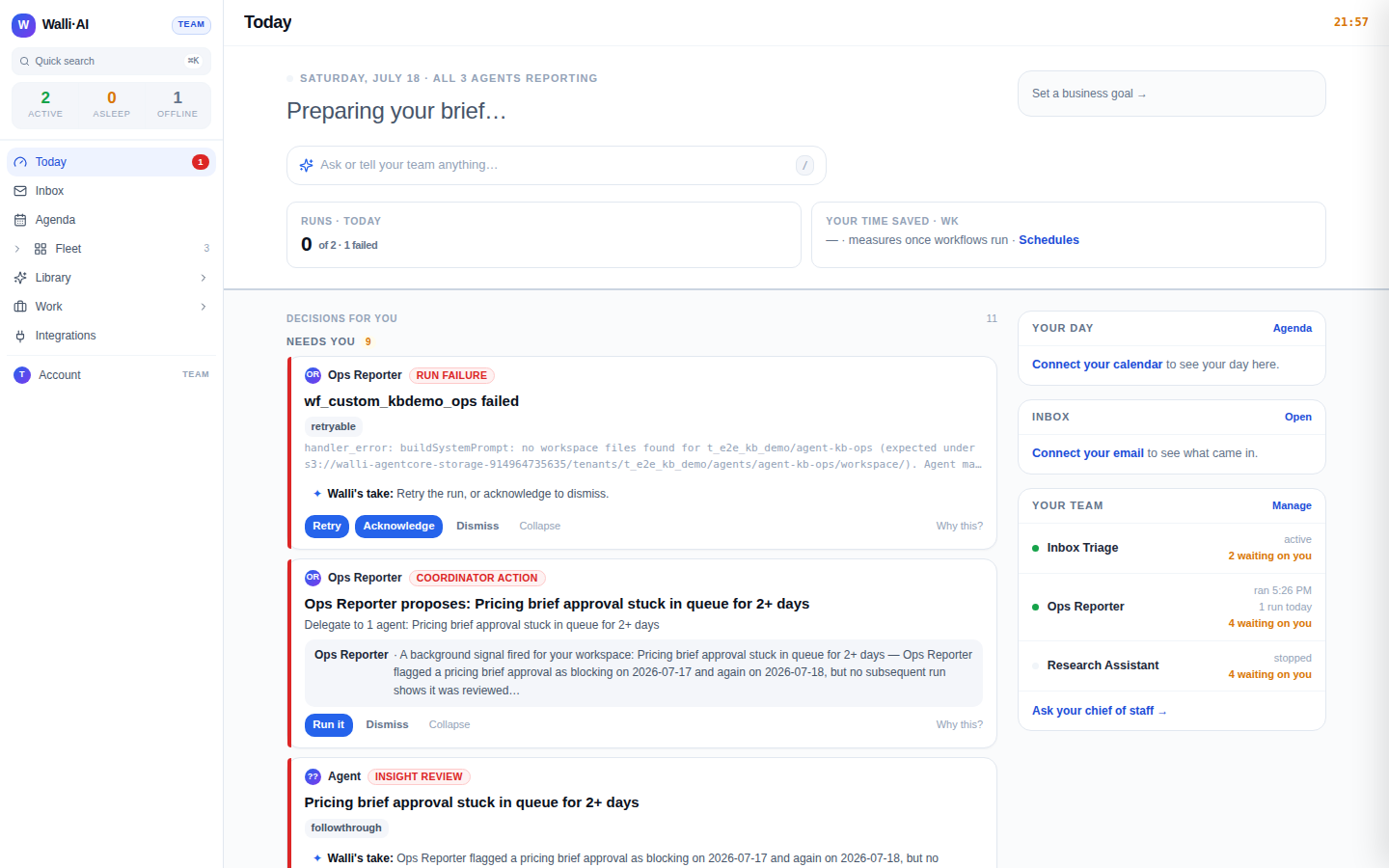
Above the individual agents sits a layer that watches across all of them and pulls the important things forward. It lands on the Today screen, which opens with a brief of what happened, a queue of decisions waiting on you, and proof of what was handled while you were away. The same layer proactively notices patterns you did not ask about: an anomaly in your numbers, a cost that spiked, a follow-up that has waited too long, a dip in an agent's output quality. Each notice comes with a proposed action you can approve or dismiss in one click, and money-related notices are computed deterministically from your data rather than written by the model, so a dollar figure is never invented. It is not a passive dashboard; every surface is also a place to act.
What "autonomous" means here
This is the word that makes people cautious, so here is the precise version. Autonomy in Walli-AI is granted per agent and per kind of task, and the default for every task is propose-only: the agent suggests and waits. An agent earns more only by getting the same kind of action approved by you repeatedly, across several days, with a high agreement rate, before the platform even offers to let it act unattended. Even with autonomy granted, sensitive work stays gated: a workflow you mark as needing approval parks its result in a review queue and blocks anything downstream until you clear it, and the proactive coordinator writes a proposal card to Today instead of acting when it is not cleared. Some limits are absolute no matter how much trust an agent has earned: it can open a GitHub pull request but never merges, it can draft email but has no ability to send, cascading automations can only chain a fixed number of hops, and work stops when a budget is exhausted. Every autonomous action is journaled with its before-state so it can be undone, and the whole story is grounded in the code, not the marketing. The full treatment lives in How Walli-AI keeps agents in bounds, which is worth reading before you hand any agent real authority.
So "autonomous" here does not mean "unsupervised." It means an agent can eventually do a specific, well-worn task without asking each time, having earned that narrow trust, inside limits the platform enforces and a trail you can inspect and reverse.
Tips
- Think in two lists: "what should run on a schedule" and "what should respond in a channel." Most of the value is in the first list, because scheduled work compounds while you are not watching.
- Keep memory and knowledge straight: upload reference material as knowledge, and let memory accumulate on its own. If an agent should know a fixed fact, that is knowledge; if it should remember a decision, that is memory.
- Start every agent in propose-only and raise its autonomy one task-type at a time, only for jobs you have watched it get right. See How Walli-AI keeps agents in bounds.
- New to the surfaces? What is Walli-AI? gives the platform tour, and Is Walli-AI right for me? helps you decide whether the shape fits your work.