Changing an agent's AI model or provider
Switch between Walli-AI Spark (managed) and your own key (BYOK), and pick the exact model.
Every agent runs on a model, and you decide which one. Walli-AI supports two paths: Walli-AI Spark, where Walli-AI runs the inference on managed infrastructure and bills it to your plan's AI Unit budget, and Bring Your Own Key (BYOK), where you paste a provider API key and pay that provider directly. The AI provider screen is where you switch between them and choose the exact model, and the change takes effect on the agent's next message. This page walks through both paths and what to expect after you save.
What you can do
- Switch an agent between Walli-AI Spark and a BYOK provider.
- Pick a specific model from the Spark catalog or from the models your BYOK key unlocks.
- Store or replace a provider API key (keys are write-only: never shown again after saving).
- Let the built-in cost optimizer suggest a cheaper Spark model with the same capabilities.
Open the AI provider screen
- Go to Fleet (
/agents) and open the agent (use its Configure action, or open it and go to its configure screens). - In the left rail select AI provider (
/agents/{id}/configure/provider). The screen header reads "Which AI model powers this agent?" and shows the agent's current provider and model.
Use Walli-AI Spark (managed)
Spark is the managed option: no API key, Walli-AI runs the model on its Bedrock infrastructure. The picker offers 11 models across Amazon, Anthropic, Mistral, NVIDIA, OpenAI and Qwen.
If the agent runs on a model that has left the picker, the Spark card says so above the picker and names the model's replacement, for example "Currently on Claude Sonnet 5, retired from the picker; its replacement is Claude Sonnet 5.5." For a coordinator agent the replacement shown is never below Claude Sonnet 5.5, the minimum model for coordinators. The agent keeps running on its current model, and you can save its other settings without changing it, or pick another model now.
- With the provider set to
Walli Spark, use the model picker to choose a model. Each model shows its provider, capability tags (tools, vision, cache, reasoning, code), and its price per 1M input and output tokens at the rate AWS bills Walli-AI. Claude Haiku 5.5 is the default; every model burns AI Units at its own AWS-billed price, so more capable models such as Claude Sonnet and Claude Opus draw more of your AI Unit budget per message. - Click Switch model to save. The change applies on the agent's next message.
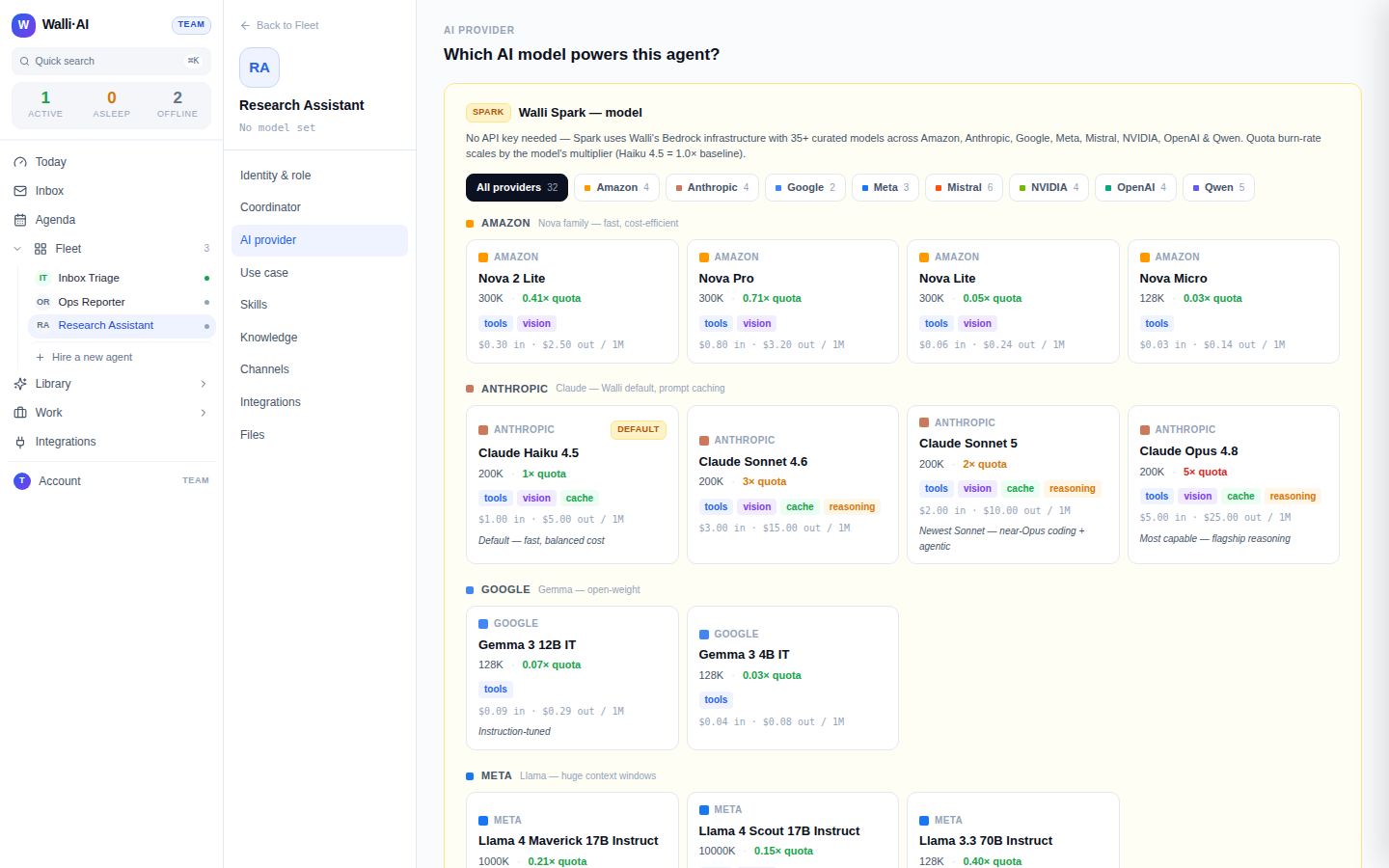
When a cheaper model can do the same job as the one you have selected, a cost-optimization callout appears with a one-click switch. It compares against the model the agent is actually running, so the suggestion reflects real savings.
Bring Your Own Key (BYOK)
With BYOK, the agent runs on your account with the provider and you are billed by them, not through AI Units.
- In the Provider dropdown pick your provider: Anthropic, OpenAI, Google, Mistral AI, Grok (xAI), Groq, or Together AI. Each has a Get key link to that provider's console.
- Paste your API key. Use the show/hide eye toggle to verify a long pasted key before saving. Keys are never returned after saving, so leave the field blank later to keep the existing key.
- Click Refresh model list. Walli-AI live-fetches the models that specific key can actually call (the list is the source of truth, not a hardcoded menu), then pick one from the Model dropdown.
- Click Save provider. The change applies on the agent's next message.
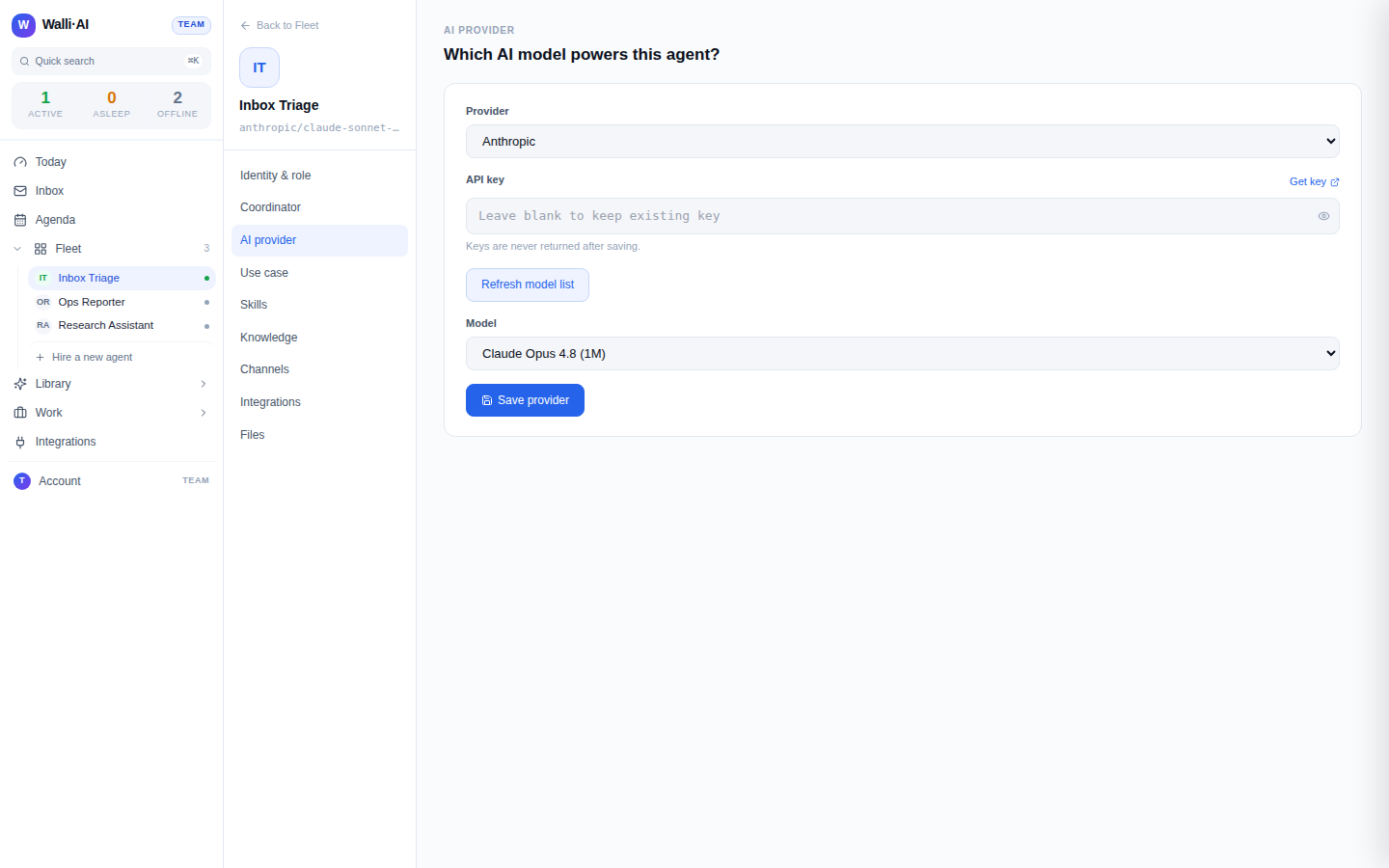
The models shown for a BYOK provider are fetched live from your key. If a model you expect is missing, your key may not have access to it yet: enable it in the provider's console, then click Refresh model list again.
Verify what an agent is using
The configure left rail shows the agent's current provider/model under its name, and the AI provider screen always reflects the saved selection. If you are unsure which model an agent runs, open its AI provider screen rather than guessing: the picker is the source of truth.
What to expect when you switch
A few behaviors are worth knowing so a switch does not catch you out:
- Changing the provider resets the model. Picking a different provider from the dropdown clears both the current model selection and any fetched model list, so after moving to (or between) BYOK providers you have to click Refresh model list again before a model appears. This is deliberate: a model one key can call is rarely valid for another key or provider.
- The save button tells you the state. On Spark the button reads Current model and stays disabled until you actually pick a different model, at which point it becomes Switch model. If it will not enable, you have not changed the selection yet.
- Accepting a cost suggestion saves instantly. When you take the one-click cost-optimization switch, the new model is written immediately, so you see the savings without a separate Save step. A manual pick, by contrast, only applies once you click Switch model or Save provider.
Tips
- Spark and BYOK are billed differently. Spark burns AI Units from your plan; BYOK bills your own provider account and consumes no AI Units. See Plans, billing, and Spark vs BYOK agents.
- Switching an agent between Spark and BYOK is a normal, reversible change; you can move back and forth as your needs change.
- For a fuller tour of the managed catalog (auto-updates, auto-upgrade when a model retires) versus the live-fetched BYOK picker, see Models: Spark catalog vs your own key.
- The per-agent quality ceiling and "never optimize this agent" controls under Identity & role interact with model selection: see Agent identity, personality, and the Compute Governor.