Add-on agents, storage, and AI Unit packs
Grow one dimension of your plan without changing tiers using add-on agents, extra storage, and one-time AI Unit packs.
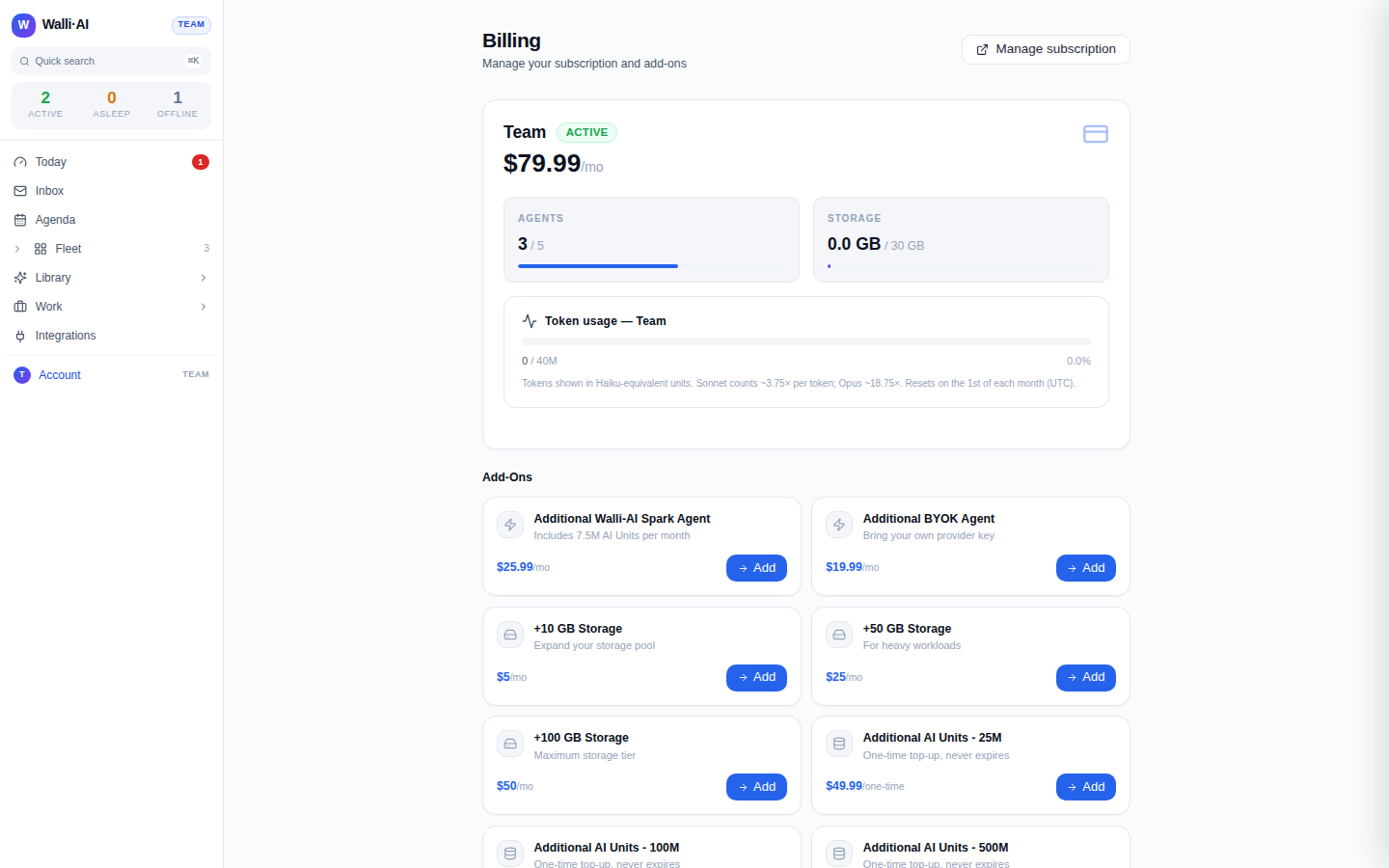
Sometimes you do not need a bigger plan, you need a little more of one thing: one extra agent, a bit more storage, or a top-up of your AI Unit budget for a busy month. Add-ons let you grow a single dimension without jumping a whole tier, which is often the cheaper move. They live in the Add-Ons section of the Billing screen and attach to whatever plan you are already on. This article explains each add-on, when to reach for it, and how buying one works. Current prices are always shown on the Billing screen; this page describes what each add-on does rather than quoting a number, so you never act on a stale figure.
What you can do
- Add an extra Spark or BYOK agent without upgrading your whole plan.
- Add storage in blocks when your files and outputs outgrow the pool.
- Top up your monthly AI Unit budget with one-time packs that never expire.
- Buy any add-on in a couple of clicks from the Billing screen.
Where add-ons live
Add-ons appear on the Billing screen (/billing) once you have an active subscription, in a grid under the Add-Ons heading. Each card shows the add-on's name, a one-line description, its current price, and an Add button. Icons group them at a glance: a lightning icon for extra agents, a drive icon for storage, and a database icon for AI Unit packs.
Extra agents
Your plan includes a fixed number of agents split between Spark and BYOK (see Choosing a plan and managing your subscription). When you hit that ceiling but do not need everything else a larger tier offers, add a single agent instead.
- Additional Spark agent. An extra managed agent that Walli-AI runs for you. Because Spark agents draw on your AI Unit budget, this add-on comes with its own monthly AI Unit allotment bundled in, so the new agent has fuel to work with from day one. Reach for this when you want another hands-off agent and do not want to manage a provider key.
- Additional BYOK agent. An extra agent that runs on your own provider API key. It carries no AI Unit allotment because you pay your provider directly for the model. Reach for this when you already have a provider account and want to add capacity without touching your Spark budget.
The practical signal for either is the same: if Hire agent is blocked on your Fleet, you have hit your plan's agent limit. Adding the matching kind of agent (Spark or BYOK) frees you to hire again without a tier change. For the difference between the two kinds and how each is billed, see Plans, billing, and Spark vs BYOK agents.
Extra storage
Your plan comes with a storage pool for the files, knowledge, and outputs your agents produce and consume. When that pool fills, storage add-ons extend it in blocks. Buy one when your Storage meter on the Billing screen is climbing toward its limit and you would rather not upgrade the whole plan just for headroom. Storage blocks stack, so you can add more than one as you grow.
AI Unit packs
Spark agents draw from a monthly AI Unit budget that resets at the start of each month. AI Unit packs are one-time top-ups for the stretches when a month runs hot.
- Packs are additive to your monthly allowance: buying one raises your available units immediately.
- Packs never expire, so anything you do not use this month carries forward. There is no "use it or lose it" pressure.
- They come in escalating sizes so you can match the pack to the size of the spike.
Because a pack carries over, a single one-time pack is often cheaper than moving up a plan tier for one busy month and then moving back down. If you find yourself buying packs every month, that is the real signal to upgrade the plan instead.
One AI Unit is $0.000001 of model usage at the rate AWS bills Walli-AI, and every model burns AI Units at its own AWS-billed price, so more capable models draw down faster. The Spark picker shows each model's price per 1M input and output tokens. On every Claude model an output token counts 5x that model's input token, and writing to the cache counts 1.25x for a 5-minute write and 2x for a 1-hour write. A cached input token counts 0.1x on most Claude models and 0.05x on Sonnet 5.5 and Opus 5.5. The non-Claude families in the catalog weigh output and cached input differently, so read the price in the picker rather than assuming the Claude ratios. A pack refills the same budget those prices spend, so pick a pack size with your heaviest models in mind.
Buy an add-on
- Open Billing (
/billing) and scroll to Add-Ons. - Find the card you want and click Add.
- If the add-on needs payment details, you are taken to a secure checkout and returned to the app afterward. Some add-ons activate immediately against your existing payment method, and the screen refreshes so the new capacity (a freed agent slot, more storage, or a higher AI Unit balance) shows right away.
To review or remove recurring add-ons later, or to update the card they bill to, use Manage subscription on the Billing screen, which opens the secure billing portal.
Tips
- Add-ons are for growing one dimension; if you keep buying several at once, compare the total against the next plan tier, which may cost less overall.
- Buy a Spark add-on agent when you want zero key management, and a BYOK add-on agent when you already have a provider account and want to keep it off your Spark budget.
- Because AI Unit packs carry over, buying one early in a busy month is low-risk: unused units are never wasted.
- Treat the Billing screen as the source of truth for every add-on price and your current balances; it is always up to date.