Spark vs bring-your-own-key, explained
The one choice that most affects your cost and control: run agents on Walli-AI's managed Spark budget, or on your own AI provider key. What each means and when to pick which.
Every agent you create makes one decision that ripples through your whole bill and your whole relationship with your AI provider: does it run on Walli-AI Spark (shown in the picker as Walli Spark), the managed model budget, or on a key you bring from your own AI provider account. The names for these are Spark and BYOK ("bring your own key"), and the difference is not a technical footnote, it is the single biggest lever on cost and control in the product. This article explains both in plain terms, side by side, so you can pick deliberately rather than accept a default you did not understand.
The one-sentence version
Walli-AI Spark means Walli-AI runs the model for you and meters it against a budget included in your plan; BYOK means you run the model on your own provider account and your provider bills you directly. Spark trades a little control for zero setup and a predictable, included budget. BYOK trades setup and a second bill for full control and no consumption ceiling. Everything else is detail on that trade.
What Spark means
When you set an agent to a Walli Spark model, you pick a model from a list and you are done. There is no provider account to create, no key to paste, no separate invoice to reconcile. Walli-AI handles the plumbing and the billing, and every token that agent spends is metered against your plan's monthly AI Unit budget, the same pool described in What Walli-AI will cost, in plain terms. Two things quietly work in your favor on Spark: prompt caching passes its savings through to your meter, so repeated context is cheap after the first read, and a compute governor routes routine, low-stakes steps to smaller, cheaper models automatically, so you are not paying premium rates for a triage decision. The catch is the ceiling: Spark usage lives inside your included budget, and if you drain it you either top up with a one-time AI Unit pack or move to a larger plan. For most scheduled, bounded work the included pool is generous and you never think about it.
What BYOK means
When you choose BYOK, you paste an API key from your own AI provider account into the agent, and that agent runs on your provider. Its model usage is billed by your provider straight to you and never touches your Walli-AI AI Unit pool. The key is encrypted and scoped to that agent, never shared across agents or workspaces. BYOK gives you two things Spark does not: direct control of your provider relationship (your own account, your own rate limits, your own negotiated pricing, your own model access) and no Walli-AI consumption ceiling, because your spend is governed by your provider, not by an included budget. The cost is the setup and the second bill: you manage a provider account and reconcile its invoice yourself, and if your key is misconfigured or empty the agent cannot run until you fix it. Walli-AI has a safety net for the empty-key case so a broken BYOK agent fails honestly rather than silently, but the account is yours to keep working.
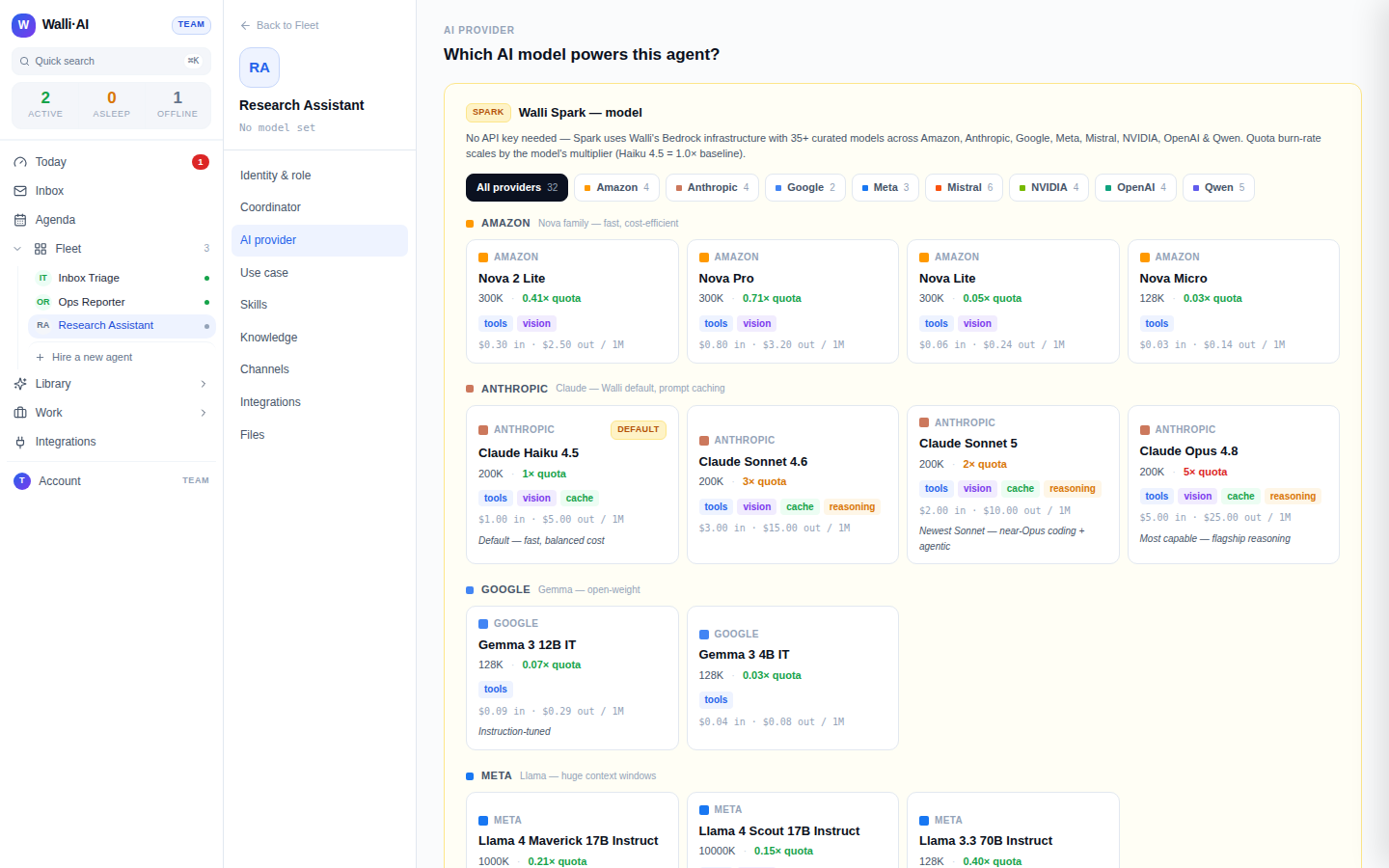
Cost and control, side by side
| Walli-AI Spark | Bring your own key (BYOK) | |
|---|---|---|
| Setup | None: pick a model | Create a provider account, paste a key |
| Who bills you | Walli-AI, inside your plan | Your AI provider, directly |
| Counts against AI Units | Yes | No |
| Ceiling | Your monthly AI Unit pool (top up or upgrade) | Whatever your provider account allows |
| Control of provider / pricing | Managed for you | Fully yours |
| Best for | Scheduled, bounded work; zero-admin | High volume; existing provider deal; own rate limits |
The row that matters most is "counts against AI Units." Spark agents share your plan's included pool; BYOK agents do not touch it. That single fact is why the two are the heart of your bill: your Walli-AI variable line is driven entirely by Spark consumption, and BYOK moves spend off that line onto an account you already control.
You do not have to choose once, or choose the same for everyone
This is not an account-wide setting; it is per agent, and you can mix freely across your fleet. The plans are sized expecting exactly that: Solo includes 1 Spark plus 1 BYOK agent, Team 2 Spark plus 3 BYOK, Business 4 Spark plus 6 BYOK, and Scale 8 Spark plus 10 BYOK. A common and sensible pattern is to run your high-volume, chatty agents (a support desk answering a channel all day) on BYOK so their heavy usage bills to your own provider account, and keep your scheduled, bounded agents (a morning brief, a weekly report) on Spark so they draw from the included budget and you never manage a second invoice for them. You can also switch an existing agent between the two at any time from its model settings; see Changing an agent's AI model or provider.
When to pick which
- Pick Spark when you want zero setup, predictable spend inside your plan, and the work is scheduled and bounded. This is the right default for most agents and the only path if you do not already have a provider account.
- Pick BYOK when you already have an AI provider account you want to keep using, you run high enough volume that your own negotiated pricing or rate limits matter, or you specifically want that agent's spend off your Walli-AI budget and on an account you control directly.
- Pick a mix when your fleet has both shapes, which most do: heavy conversational agents on your key, quiet scheduled agents on Spark.
Tips
- Default new agents to Spark and only move an agent to BYOK when its volume or your provider relationship gives you a concrete reason. Setup you do not need is setup you should skip.
- Put your busiest, most talkative agent on BYOK first: it is the one whose usage most benefits from billing to your own account instead of your included pool.
- Watch the Billing screen's AI Unit forecast to see your Spark agents' real draw; if it projects past your pool, that is your signal to move a heavy agent to BYOK, top up with a pack, or upgrade. See What Walli-AI will cost, in plain terms.
- The deeper plan-and-persona breakdown lives in Plans, billing, and Spark vs BYOK agents.