What Walli-AI will cost, in plain terms
The whole bill is a flat plan price plus, if you use managed Spark models, an AI Unit budget. How to read it, what the add-ons cost, and how to estimate a month before you commit.
The fear behind "how much will this cost" is not the sticker price, it is the unknown: an autonomous agent that works while you sleep sounds like a bill you cannot predict. Walli-AI is priced so that it can be. Your bill is a flat monthly plan price, and on top of that the only variable is how much managed AI you consume, which is metered against a budget that is included in the plan and that you can watch fill up in real time. If you would rather have no variable at all, you can run agents on your own AI provider key and the managed budget never enters the picture. This article explains every piece of the bill, then walks a real month end to end so you can estimate yours before you commit a card.
The two things you pay for
There are exactly two components to a Walli-AI bill, and understanding the split is the whole game:
- A flat plan price, billed monthly. This buys you a fixed number of agents, seats, and storage, plus a monthly allowance of managed AI. The four plans are Solo at $29.99/mo, Team at $79.99/mo, Business at $199.99/mo, and Scale at $449.99/mo. There is no tier above Scale and no custom-contract tier: you grow past Scale with add-ons, not a sales call.
- Managed AI consumption, but only for agents that use Walli-AI's managed models. This is metered in AI Units, and every plan includes a monthly pool of them. You pay more only if you exhaust the pool and choose to top it up.
That is the entire structure. Everything below is detail on those two lines.
Spark budget versus bringing your own key
Each agent you create runs one of two ways, and the choice decides whether it touches your AI Unit budget at all.
- A Spark agent runs on Walli-AI's managed inference. You pick a model and the platform handles the provider plumbing and the billing. Every token it uses is metered against your plan's monthly AI Unit pool. This is the zero-setup path.
- A bring-your-own-key (BYOK) agent runs on an AI provider account you own. You paste your provider key, and that agent's model usage is billed by your provider directly to you, never through Walli-AI and never against your AI Unit pool.
You can mix the two across your fleet: run a chatty support agent on your own key to keep your provider relationship, and let a scheduled analyst run on Spark so you never manage a second bill. The plans are sized with this split in mind. Solo includes 1 Spark and 1 BYOK agent; Team includes 2 Spark and 3 BYOK; Business includes 4 Spark and 6 BYOK; Scale includes 8 Spark and 10 BYOK. The deeper mechanics of the split are covered in Spark vs bring-your-own-key.
What an AI Unit is, and how big your pool is
AI Units are the meter for managed inference. One AI Unit is $0.000001 of model usage at the rate AWS bills Walli-AI, so a Unit is a small, steady thing rather than a mysterious credit: a Claude Haiku 5.5 input token (the Spark default) burns 0.11 of them, and a single agent run that reads a long document spends thousands. The number that matters is how many your plan includes each month: Solo includes 15 million AI Units, Team 40 million, Business 120 million, and Scale 300 million. These are generous pools sized for real scheduled work, and two features stretch them further. Prompt caching passes its savings straight through to your meter: after the first read, repeated context (a system prompt, a knowledge base) is charged at a fraction of the normal input rate, which is 0.1x on most Claude models and 0.05x on Sonnet 5.5 and Opus 5.5. It is a discount, not a waiver, and writing to the cache is charged too (1.25x a normal input token for a 5-minute write, 2x for a 1-hour write), so the saving you see is net of those writes. And the compute governor routes routine, low-stakes steps to smaller, cheaper models automatically, so you are not paying premium-model rates for a triage decision that a small model handles correctly.
The AI Unit meter counts dollars of model usage, and every model burns AI Units at its own AWS-billed price, so a bigger model spends Units faster per token because it costs more to run. The Spark picker shows each model's price per 1M input and output tokens. The full table, including cache read and write prices for every model, is the Model prices section of the article "Choosing a plan and managing your subscription". This is why "how many Units will I use" depends on which model an agent runs, not just how many words it produces.
Add-ons: agents, storage, and AI Unit packs
If you outgrow one dimension of your plan without needing a whole tier, you add just that dimension:
- Extra agents. Add a Spark agent (it brings its own included AI Unit allotment) or a BYOK agent (no allotment, since it runs on your key). This is usually cheaper than jumping a tier when agents are the only thing you are short on.
- Extra storage. Storage add-ons come in 10 GB, 50 GB, and 100 GB blocks that stack on top of your plan's pool (10 GB on Solo up to 200 GB on Scale).
- AI Unit packs. If a busy month drains your pool, one-time packs of 25 million, 100 million, or 500 million Units top it back up. Packs do not expire, so buying one is not a "use it or lose it" gamble.
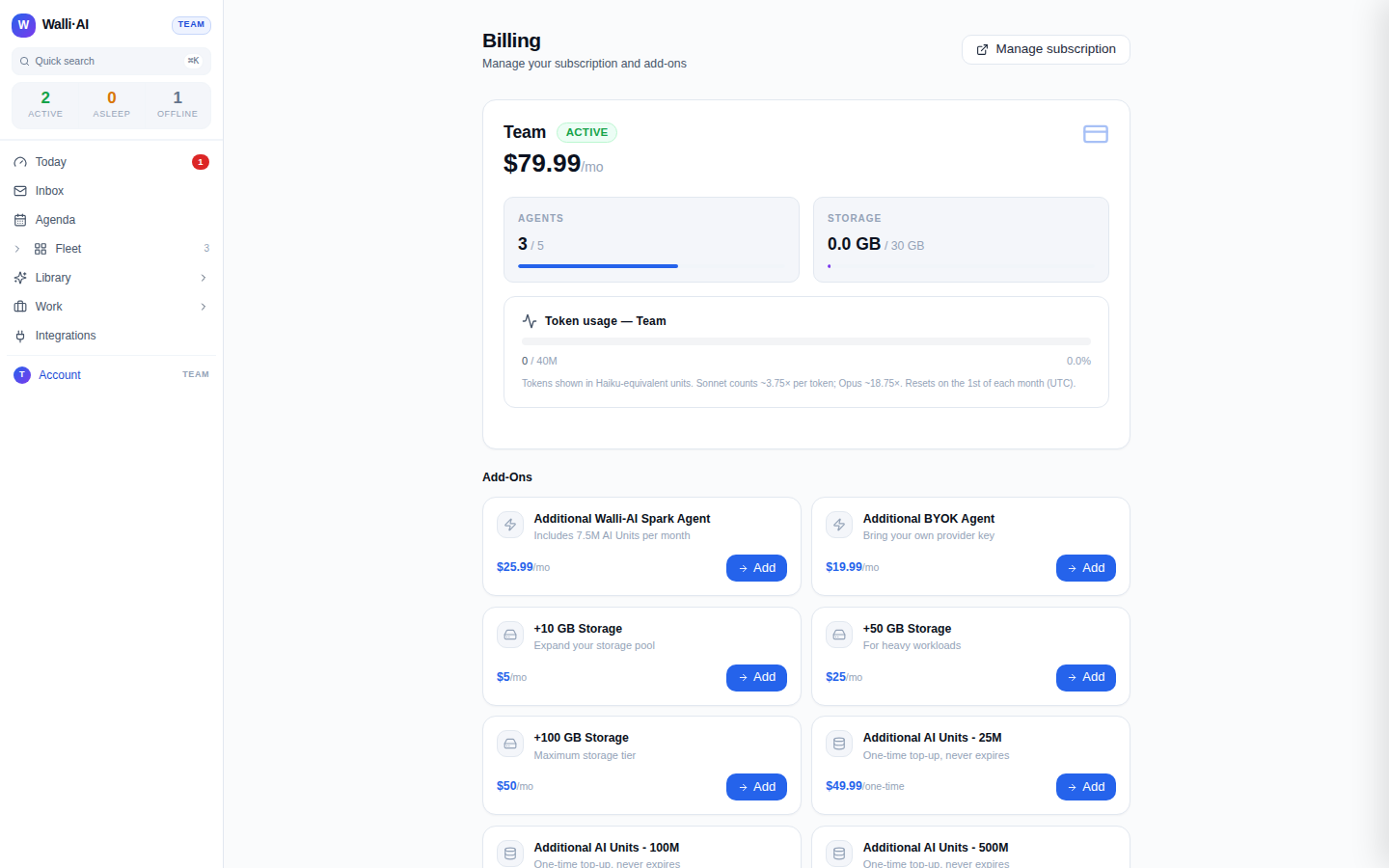
Exact add-on and pack prices live on the Billing screen and in Add-on agents, storage, and AI Unit packs, because those are the authoritative, always-current numbers. The shape to remember: agents and storage are small recurring add-ons, AI Unit packs are one-time top-ups.
How to estimate a month before you commit
You do not have to guess. The estimate has three questions:
- How many agents, and how do they run? Count the agents you want and decide which run on Spark versus your own key. That count picks your plan (or tells you to add an agent to a smaller one).
- How much scheduled work? A handful of daily briefs and a few weekly reports is light; dozens of agents each running multiple times an hour is heavy. Scheduled work is the main driver of AI Unit consumption because it runs whether or not you are watching.
- Which models? Premium models on every step spend Units faster; letting the governor route routine steps to small models spends them slower. Most fleets land in between.
Then you stop estimating and start measuring. The Billing screen shows your AI Units consumed so far this month and a forecast tile that projects where you will land at your current pace, plus a per-agent breakdown so a runaway agent is obvious. A few days into your first real month, that forecast is a far better predictor than any up-front guess, and it tells you whether to ride out the month or buy a pack before you run dry.
A worked example
Say you are a solo operator. You want two agents: a support agent that answers Slack and Discord all day, and an analyst that builds a KPI report every morning and a deep digest every Friday. You already have an AI provider account, so you put the chatty support agent on BYOK (its usage bills to your provider, never touching your pool) and run the analyst on Spark.
- Plan: Solo at $29.99/mo covers 1 Spark plus 1 BYOK agent, 1 seat, and 10 GB of storage, which exactly fits this shape. Your predictable line is the Solo price.
- AI Units: only the Spark analyst draws from your 15 million monthly pool. A daily report plus a weekly digest is modest scheduled work. With caching on the report's stable structure and the governor handling routine steps on small models, this comfortably fits inside the included pool, so your AI Unit line is zero on top of the plan.
- BYOK support agent: billed by your own provider on your own account, so it never appears on your Walli-AI invoice.
Your Walli-AI bill for that month is the flat Solo price, full stop. If the analyst's work grew (more reports, heavier models, more agents) you would watch the forecast tile, and if it projected past 15 million you would either move to Team, which quadruples the pool to 40 million and raises the agent and seat counts, or buy a one-time 25-million AI Unit pack. Either way you would decide with a real number in front of you, not a surprise on the invoice.
Tips
- Put your talkative, high-volume agents on your own provider key and reserve Spark for scheduled, bounded work; that keeps your Walli-AI variable line small and predictable.
- Watch the AI Unit forecast tile a few days into a busy month. It answers "am I about to run out" before you actually do, so you can top up on your terms.
- When you are short on only one thing (one more agent, a little more storage), reach for an add-on before jumping a whole tier: Add-on agents, storage, and AI Unit packs has the current numbers.
- The Billing screen is always right about money: prices and allowances there come straight from the live catalog, so trust it over any number you remember. See Choosing a plan and managing your subscription.