Follow-ups: closing the loop after a run
When an agent finishes a run and already knows the next step, it proposes a follow-up on Today so the loop closes instead of waiting on your memory.
A follow-up is the platform proposing the next step after a run finishes. When a workflow completes and the agent produced a confident, specific next action, Walli-AI does not just print a "Do next" note and hope you remember. It raises a follow-up card on Today so you can close the loop in one click: schedule the agent to do it, connect the tool it needs, or dismiss it if it is not needed. This article explains where follow-ups come from, the shapes they take, and how to act on them.
What you can do
- See a proposed next step surface automatically after a run, on Today.
- Schedule the agent to carry out that next step with one click.
- Connect a missing tool when the agent needs one to do the step itself.
- Dismiss a follow-up when the loop is already closed or not worth it.
- Open the source run for full context before you decide.
Where follow-ups come from
Follow-ups are generated by a background process, not by you.
- When a scheduled workflow run succeeds and its result carries a next action the agent was confident about, the platform refines that next action into a directive the same agent could execute.
- It writes the follow-up as a proposed card. The platform never auto-fires it: it proposes, and you commit. This mirrors how the schedule tuner proposes a review rather than changing a schedule on its own.
- Conversational and one-off chat runs never generate follow-ups; you are already in the conversation there, so there is nothing to remember. Follow-ups exist for the work that happened while you were away.
The demo tenant used for these screenshots has a research run whose next step became a follow-up card, which is what the screenshot below shows in the Today queue.
Act on a follow-up from Today
Follow-ups appear in the Decisions for you queue on Today, alongside insights and approvals. A follow-up that needs your sign-off lands in Needs you; a lower-stakes one lands in When you have a minute. The card names the agent and states the proposed next step. What you can do depends on which of three shapes the follow-up takes.
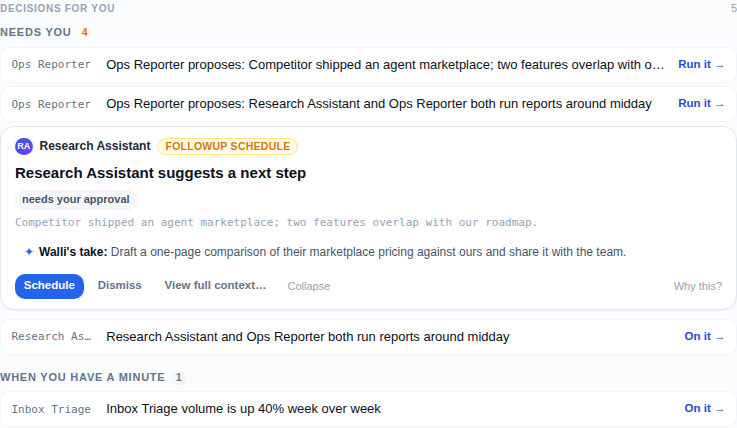
The agent can do it: Schedule or Dismiss
This is the common case: the agent could carry out the next step itself. The card reads "{Agent} suggests a next step" and offers two buttons.
- Schedule commits the follow-up: the agent is set to carry out the refined directive. This is the one-click way to turn "here is what should happen next" into "it is happening."
- Dismiss clears the card when the loop is already closed or the step is not worth taking. Dismissing is also how the platform learns which follow-ups you find useful.
- When the follow-up came from a specific run, a View full context link opens that run in the Library so you can read the source before deciding.
The agent needs a tool: Connect or do it manually
Sometimes the next step needs an integration the agent does not have connected. In that case the card changes to "Connect {tool} so {agent} can do this for you." It explains that once the tool is connected on the Integrations page the agent can handle it itself, and offers a Configure link to connect it. You can also dismiss the card and do the step manually using the directive as your instructions.
Yours to do: the steps, ready
Some next steps are inherently a person's job, nothing an integration could do. Those cards read "Yours to do" and carry the prepared steps as the directive, tagged "needs you." There is nothing to schedule here; the card is a reminder with the instructions already written out. Dismiss it once you have handled it.
How follow-ups clear
A follow-up leaves the queue when you act on it: scheduling it, connecting the tool, or dismissing it all resolve the card and it disappears on the spot. Follow-ups you never touch expire on their own after two weeks so the queue never fills with stale proposals. Because every resolution is recorded, the platform gradually learns your preferences and proposes follow-ups that match what you actually accept.
Follow-ups sit alongside the other decision types on Today, so the same rules apply: a card that needs your sign-off ranks higher, a lower-stakes one waits under When you have a minute, and each card carries a Why this? disclosure naming the agent and the run it came from. Only confident, specific next actions ever become follow-ups; a vague or low-confidence next step is filtered out before it ever reaches your queue, which keeps this stream signal rather than noise. For the broader queue and the other card sources, see Your daily brief (Today), Insights, and Recovering from a failed run.
Tips
- Treat Schedule as your default when the proposed step is genuinely the next thing you would have asked for; it saves you from re-issuing the instruction by hand.
- Use View full context before scheduling anything you are unsure about; the source run tells you exactly why the agent proposed it.
- When a follow-up asks you to connect a tool, weigh whether you want the agent doing that kind of step going forward: connecting it once turns future follow-ups of that shape into one-click schedules.
- Dismiss freely. Dismissing is not just clearing clutter; it teaches the platform which follow-ups are worth proposing to you.