How Walli-AI keeps agents in bounds
Autonomous does not mean unsupervised. The controls that keep an agent inside the lines you set, and let you see and undo everything it does.
The honest concern with any autonomous agent is simple: will it do something you did not want, touch data it should not, call somewhere it should not, or run up a bill while you are asleep. Walli-AI is built so the answer is no by default. An agent starts with almost no standing authority, earns more only as you approve its work, and operates inside limits that are enforced by the platform rather than by the agent's own good behavior. This article walks through those controls, grouped by the worry each one answers, so you can see exactly where the guardrails are before you rely on an agent.
What "in bounds" means here
Every important boundary in Walli-AI fails closed. When a check cannot be satisfied, the safe thing happens: the agent proposes instead of acting, the request is denied before any secret is read, the cascade stops, the run parks for your review. Nothing below depends on the language model choosing to behave. The limits sit in the database, the network layer, and the dispatcher, where the agent cannot reach them.
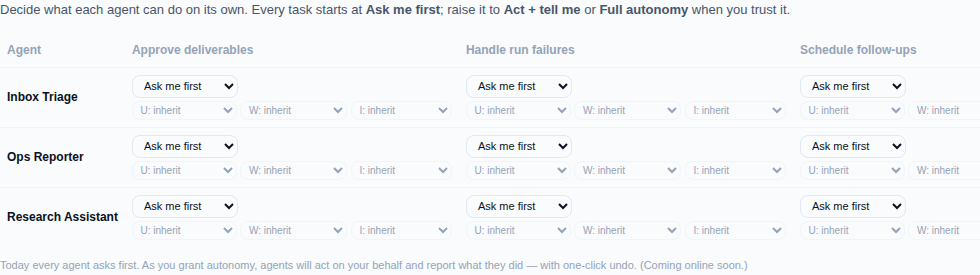
An agent earns autonomy, it does not start with it
A new agent can suggest, not act. Permission to act on its own is granted per agent and per kind of task, and until you grant it the agent's default posture is to propose and wait. That grant is not a switch you flip once on a hunch: an agent has to earn it by getting the same kind of action approved by you many times, across several different days, with a high agreement rate, before Walli-AI offers to let it run that action unattended.
Even with autonomy granted, sensitive work stays gated. A workflow you mark as needing approval delivers its result into a review queue instead of completing, and anything downstream that would have chained off it is blocked until you approve. The proactive coordinator follows the same rule: when it spots something it is not cleared to handle, it writes a proposal card to your Today page rather than acting, so the decision stays yours.
Your data stays yours
Separation between customers is enforced by the database, not just by application code. The structured tables layer uses row-level security that the app's own database user is forbidden from bypassing, keyed to the tenant on every query, so one workspace cannot read another's rows even if a bug tried to. For every other record, the tenant identity comes only from your signed login token, never from anything the agent types into a request, so an agent cannot ask for another workspace's data by guessing an identifier. Knowledge you upload is searched only within your own workspace, and one agent handing work to another only ever reaches agents inside your tenant. There is no path by which an agent works across customers.
Agents never hold your keys, and cannot call just anywhere
When an agent needs to reach an outside service, it never sees the API key. Every credentialed outbound call goes through a broker that checks the request against an allow-list first and only then injects the secret on the server side. If the check fails, the secret is never even read. The allow-list blocks the addresses an exfiltration attempt would target: internal hostnames, cloud metadata endpoints, private network ranges, and disguised encodings of them, with the URL normalized first so a path cannot sneak past with .. tricks. Each credential is bound to a single host and carries rate and volume caps, so a runaway loop is throttled rather than left to hammer a service or drain data. And the code sandbox, where an agent runs Python or Node to analyze your data, has no internet access at all: it can work with the data you stage into it and write results back, but it cannot call out.
Reversible where it counts, and on the record
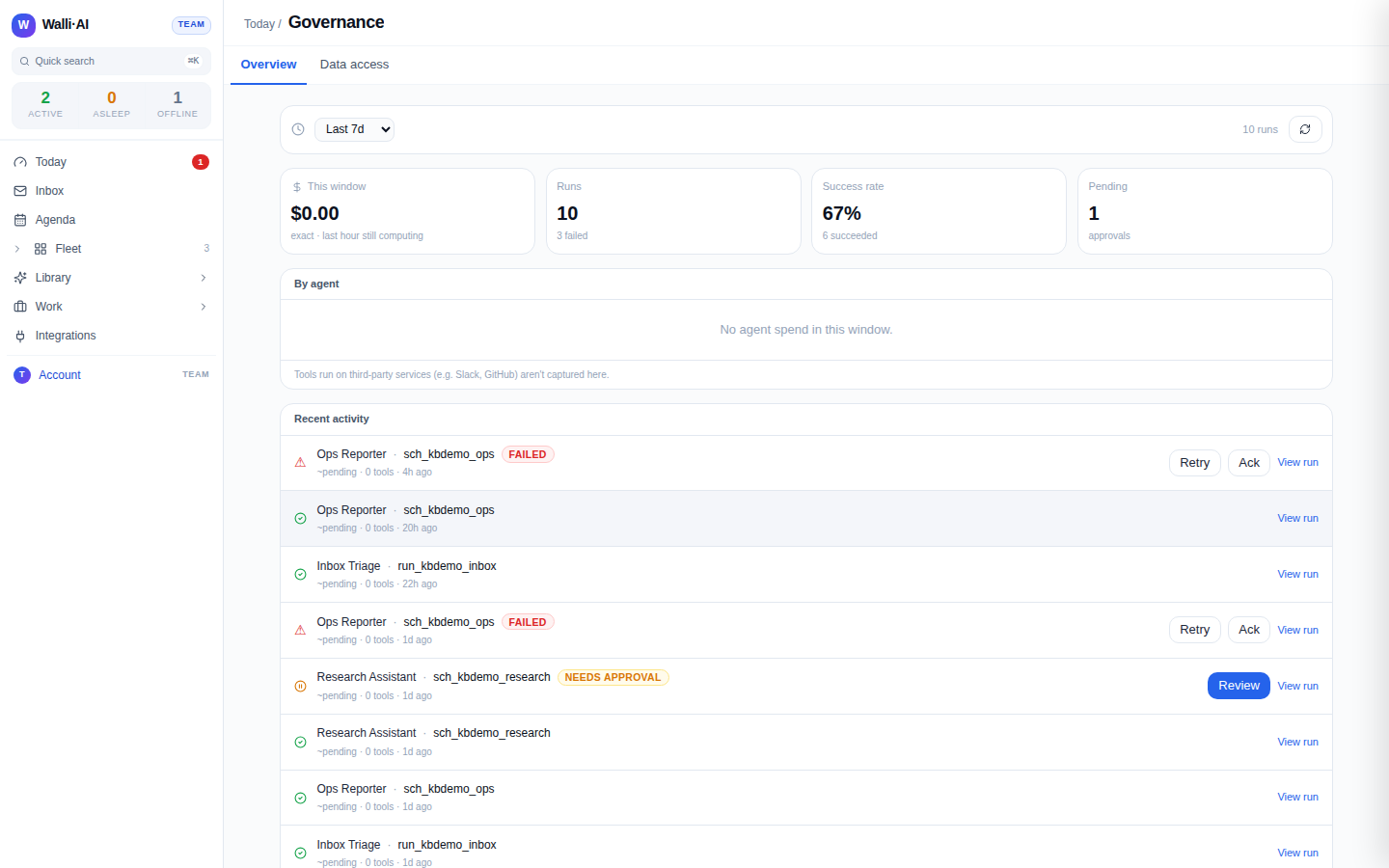
The routine actions an agent takes on its own are recorded with their before-state so they can be genuinely rolled back, which is what makes acting on your behalf safe rather than scary. When the coordinator changes something for you, the prior state is journaled, and the handled items on your Today page each carry an Undo button. Outbound actions that leave the platform, like a message posted to a channel, cannot be un-sent, which is one reason sensitive workflows deliver into a review queue first. Beyond undo, everything is visible: every action an agent takes through Walli-AI's own tools is logged per run with what it did, whether it succeeded, and how long it took, and every run is inspectable with its outcome, its cost, and any approvals it needed. Money figures in reports and briefs are computed deterministically from your data, never written by the language model, so an agent cannot present an invented number as a result. If it has no real figure, it shows none rather than guessing.
Hard limits an agent cannot cross
Some boundaries are absolute, regardless of how much autonomy an agent has earned. An agent working in GitHub can open a pull request for your review but can never commit to your default branch and never merges: a human always does. An agent working your email can draft replies but has no ability to send: drafts wait for you to review and send. Cascading automations, where one automation's result triggers another, can only chain a fixed number of hops before the platform cuts them off, so nothing loops forever. And when a workspace reaches its usage budget, work is gated rather than allowed to run up an open-ended bill.
Your account, and where to look
Getting into the account is protected too. Two-factor authentication is required before you reach the workspace, with a passkey, an authenticator app, or an email code, so a leaked password alone is not enough. Each teammate carries a role that scopes what they can do, resolved at login and stamped into their session.
You do not have to take any of this on faith. The Governance page shows the audit log and what each agent has been doing, your account security settings manage two-factor and passkeys, and the credentials and egress surface shows exactly which outside hosts an agent is allowed to reach. The whole point is that the guardrails are visible and yours to set.
Tips
- Start a new agent in propose-only mode and grant autonomy only for the specific tasks you have watched it get right. There is no penalty for keeping an agent on a short leash.
- Mark any workflow that spends money, contacts customers, or changes external systems as needing approval, so its results always land in a review queue.
- Use the audit log and each run's detail to spot-check an agent's work early on. Seeing a few runs end to end is the fastest way to build the confidence to hand off more.
Actions your agents take through third-party tools that run on another vendor's servers (for example a connected Slack or GitHub app) happen on that vendor's side, so Walli-AI records the call it made but the vendor's own systems govern what happens next. The controls above apply to everything Walli-AI runs directly.