Your first real outcome, fast
The shortest honest path from signup to one concrete result the same day. Hire an agent, give it a single job, run it in chat or on a schedule, and find the deliverable it produced.
The honest worry when you sign up for anything called an "AI agent platform" is that you will spend an afternoon configuring and still have nothing to show for it. So the fastest way to evaluate Walli-AI is not to read about everything it can do; it is to get one real, finished piece of work out of it the same day, look at that result, and decide from there. This article is that path, start to finish. It is deliberately narrow: one agent, one job, one deliverable you can point at. Everything else can wait until you have proof it works for you.
Pick one job first, before you touch anything
The single biggest predictor of a fast first outcome is choosing the right first job. You want something that is recurring, reads some real input, and ends in a concrete artifact you would recognize as useful. Good first jobs: a morning brief that reads your inbox and calendar and tells you what matters; a standup digest posted to your team channel; a research digest on a topic you track; a summary of a document you drop in. Bad first jobs for day one: anything that needs a tool you have not connected yet, anything open-ended with no clear finish line, or anything on the platform's out-of-scope list (fully autonomous outbound email, auto-negotiated meetings). If you are unsure whether your job fits the shape of the tool at all, read Is Walli-AI right for me? first; it is the honest fit guide and will save you from forcing a poor match.
Step one: hire an agent
An agent is the worker. Creating one is the first thing you do after signing in, and it is fast: you give it a name and a persona, pick whether it runs on Walli-AI's managed Spark inference or your own provider key, and you have a worker ready for a job. You do not need to configure everything up front. A name, a role, and a model are enough to get a first result; you can refine memory, skills, and tools later once you have seen it work. The full walkthrough of every field is in Creating or setting up a new agent, and if you want the mental model of what an agent actually is before you make one, How agents actually work is the ten-minute version.
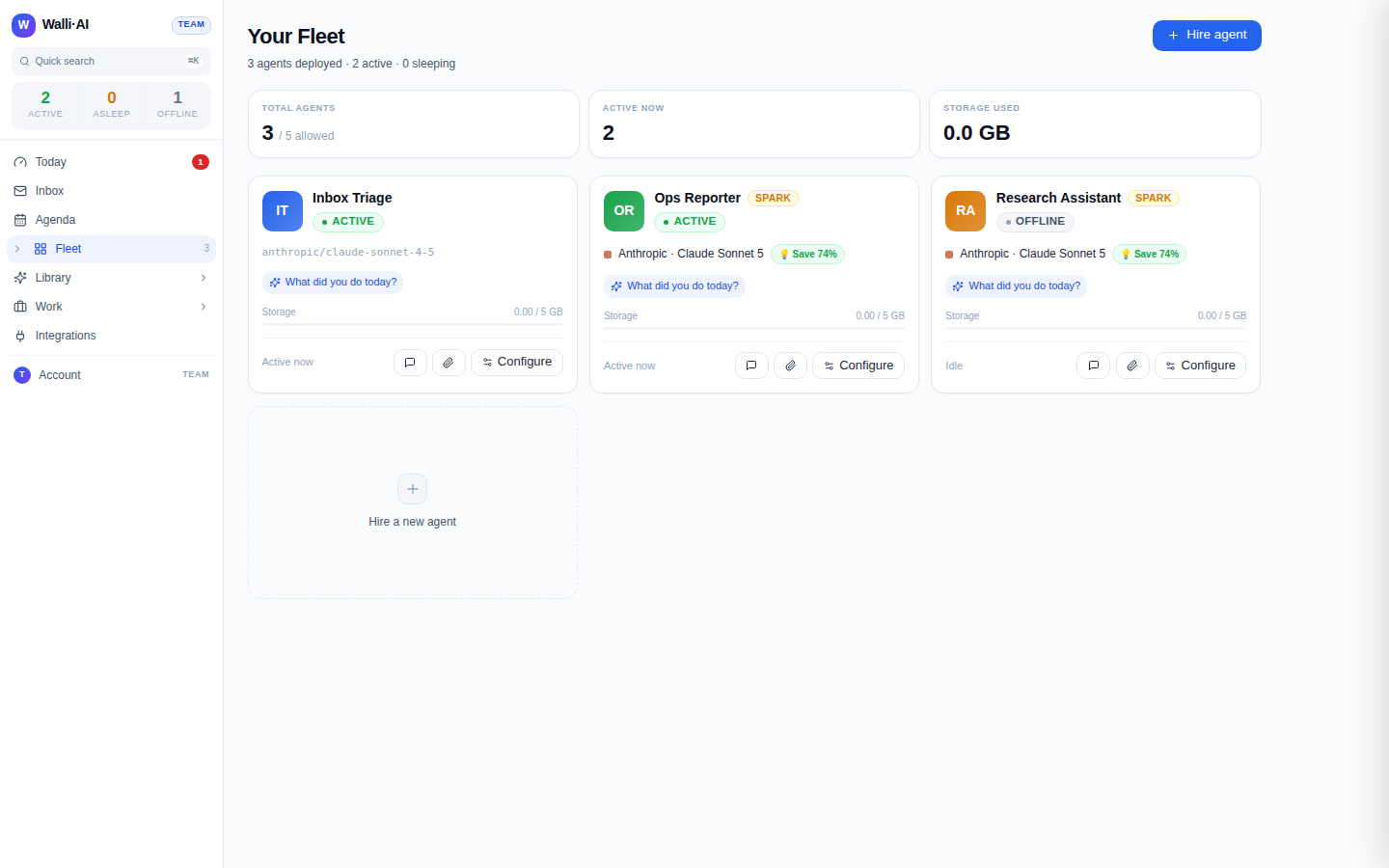
Step two: give it the job, one of two ways
Now you point the agent at the job you picked. There are two ways to run it, and for a first outcome the difference is just whether you want to watch it happen or have it happen on its own.
- Ask it in chat. Open the agent and type the job as if you were briefing a capable new hire: "Read my inbox from the last day and give me a triage brief of what actually needs me." You watch it work, it produces the result in front of you, and you have your first deliverable in a couple of minutes. This is the fastest possible path to seeing something real, and it is the right choice for your very first run because you can see exactly how the agent interprets the job. The basics of talking to an agent, including how to be specific enough to get a good result, are in Chatting with an agent.
- Put it on a schedule. Once a chat run has proven the job works, the more valuable move is to make it recurring, so the brief lands every morning whether or not you remember to ask. You set a cadence (a preset like "every morning" or a cron expression) in your workspace timezone, and the agent runs on its own and delivers the result. This is where the platform earns its keep: work that happens without you triggering it. Scheduling every kind of run is covered in Scheduling an agent or workflow to run automatically.
For a first day, do both in order: run it once in chat to confirm the output is what you want, then schedule that same job so tomorrow's version arrives without you.
Step three: find the deliverable and judge it
The point of the whole exercise is the artifact at the end, so the last step is knowing where it lands. Every run an agent completes produces a result you can find later, not just a message that scrolls away. Chat results appear in the conversation and in the agent's run history; scheduled and workflow runs land in your Library as deliverables, each with the run that produced it, its cost, and any approval it needed. Open the deliverable, read it, and ask the honest question: is this something I would have wanted a person to hand me? That answer, on a real piece of your own work, is worth more than any demo. Where results live and how to review and approve them is covered in Finding past results, reviewing and approving.
Copy a recipe instead of starting blank
If you would rather not invent the first job, start from a worked one. The recipe articles are complete, end-to-end setups you can follow step by step, each ending in a real deliverable. Two that make excellent first outcomes: Turn your inbox into a morning triage brief and A daily standup digest, posted to your team channel. Each tells you exactly which agent to make, what to say to it, and how to schedule it, so your first result is a matter of following along rather than designing from scratch.
What "fast" honestly means here
Fast means one finished result the same day, not a fully built-out workspace. You will not have connected every integration, tuned every skill, or wired up automations on day one, and you should not try to. The goal of the first day is a single proof: that you can hand this thing a real job and get back something you would actually use. Once you have that, expanding is easy and unhurried; without it, no amount of configuration matters. Build the proof first.
Tips
- Run your first job in chat before you schedule it. Seeing the output once tells you whether your instructions were specific enough, and it takes two minutes.
- Choose a first job that already has its inputs available. If it needs an integration you have not connected, connect that first or pick a different job, so your first run is not blocked on setup.
- Do not worry about cost on day one. A single agent doing a couple of runs is negligible, and if you want the full picture before committing, What Walli-AI will cost, in plain terms walks a real month end to end.
- Once your first scheduled job is landing reliably, add a second. Two good agents doing two recurring jobs is a far better read on the product than one agent you overloaded.